


A leaked HyperOS 4 setup screen has exposed Xiaomi’s planned onboarding flow and a list of ten major features. The files directly reference “Xiaomi HyperOS 4” and divide several features by device class, with some Glass effects marked for flagship models and Q18. The leak also supports earlier information about Xiaomi’s new Glass interface, AI features, widget stacking, and redesigned system apps.
The leaked configuration includes:
title: New Xiaomi HyperOS 4
text: Tap to experience new features
landTitle: OS4
landText: New features
aodTitle: Tap to experience new OS4 features
aodText: Tap to experience new OS4 features
HyperOS 4 Setup Lists 10 New Features
The leaked onboarding package contains ten sections:
- Basic Experience — All Models
- Glass Material — Flagships and Fold 5 Only
- New Lock Screen Experience — Flagship, Glass
- Desktop Widget Stacking — Flagship, Glass
- Folder Size Switching — Flagship, Glass
- New Xiaomi HyperConnect Device Center — Glass
- Super XiaoAI Interaction Redesign — Flagship, Glass
- Super XiaoAI Expert Mode
- New AI Notes
- Xiaomi Intelligent Input Method
This is important because the package does more than show concept images. It includes internal labels that describe how Xiaomi plans to present HyperOS 4 features during setup.
Glass Features Are Clearly Split by Hardware
One of the most interesting entries is: “Glass Material”
This supports the earlier leaked source-code information showing that HyperOS 4’s full Liquid Glass rendering will not be available on every chipset.
Previous code findings pointed to support for:
- Snapdragon 8 Elite and newer
- XRING O1
- XRING O3
- Dimensity 9500 and newer
The new setup files now add another useful clue: Xiaomi itself appears to separate Glass features from the basic HyperOS 4 experience. In other words, a device may receive HyperOS 4 without receiving every advanced Glass effect.
We previously covered Xiaomi’s HyperOS 4 Liquid Glass design direction and the HyperOS 4 V8 Launcher leak. The new onboarding files provide stronger evidence that these effects are part of the actual HyperOS 4 feature set rather than only an experimental launcher design.
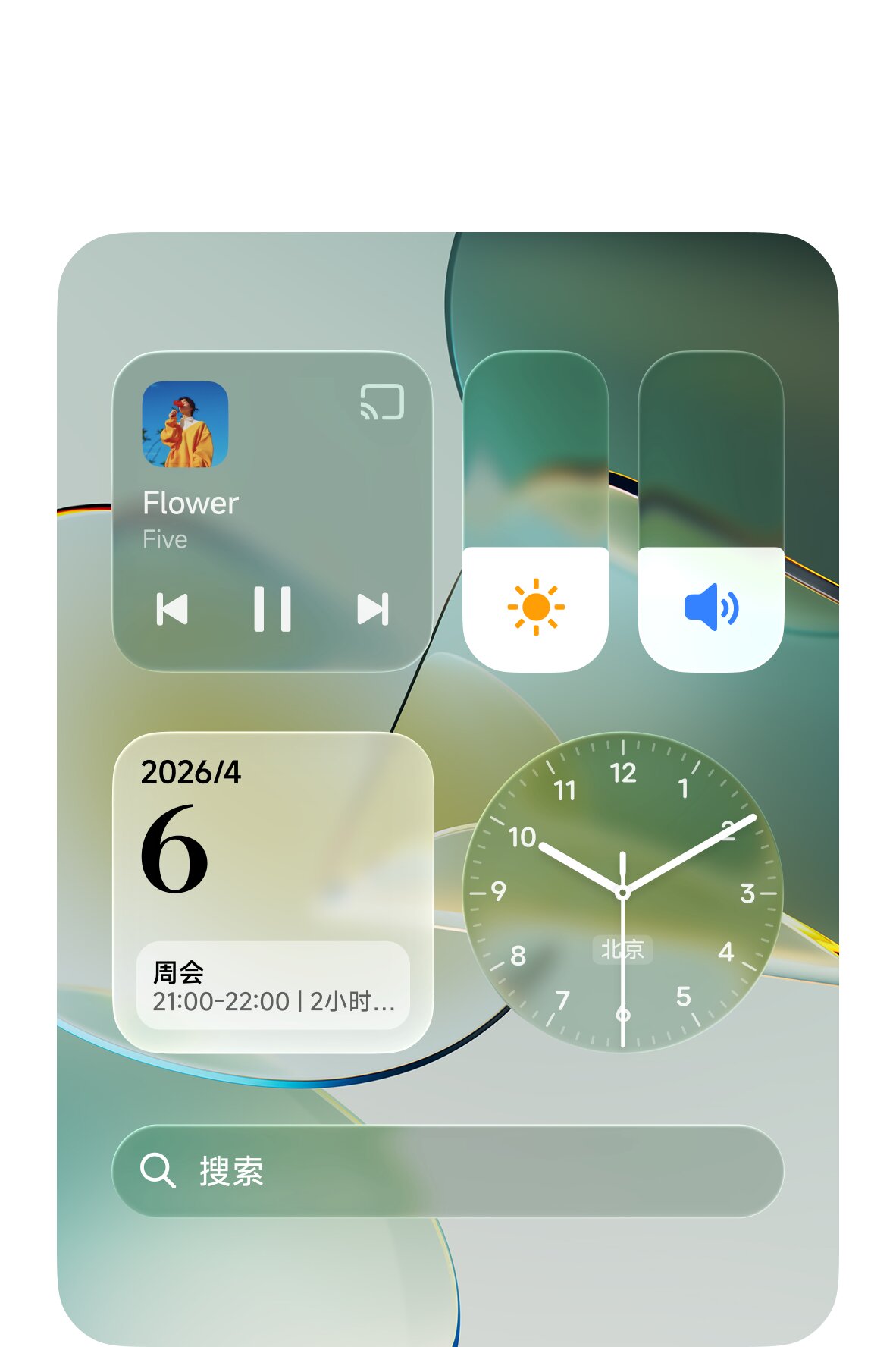
New Lock Screen Uses the Glass Interface
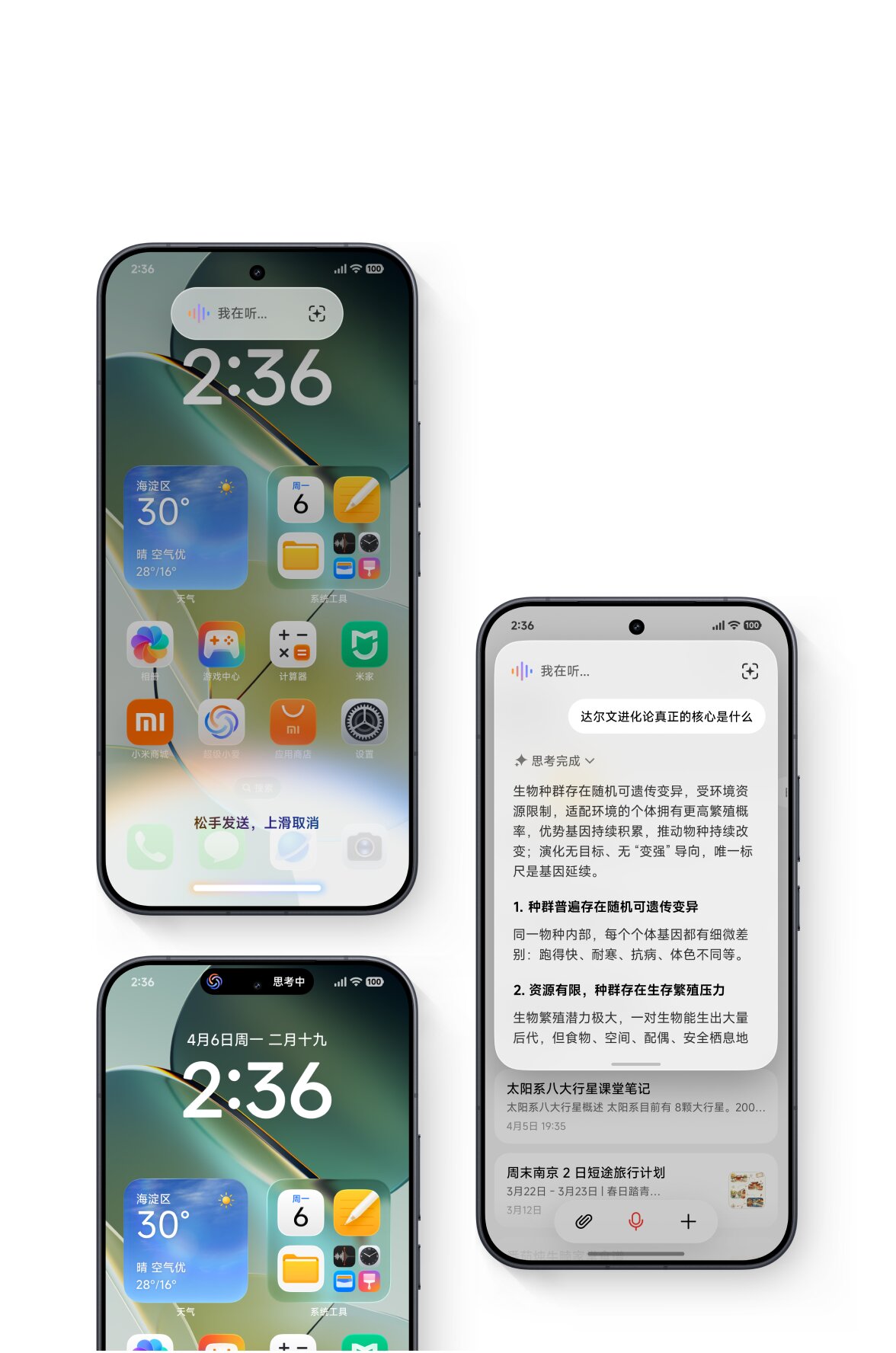
The leaked screenshots show a major lock-screen redesign. Large transparent clock layouts can sit directly over photos and wallpapers. Some styles use oversized vertical numbers, while others combine the clock with translucent notification cards.
The setup file specifically labels the new lock-screen experience as: “Glass.” That suggests the complete Glass version of the lock screen may be limited to higher-end devices. The notification design also matches earlier reports about stacked lock-screen notifications. Instead of several separate cards taking up the screen, notifications can appear in a layered Glass container.
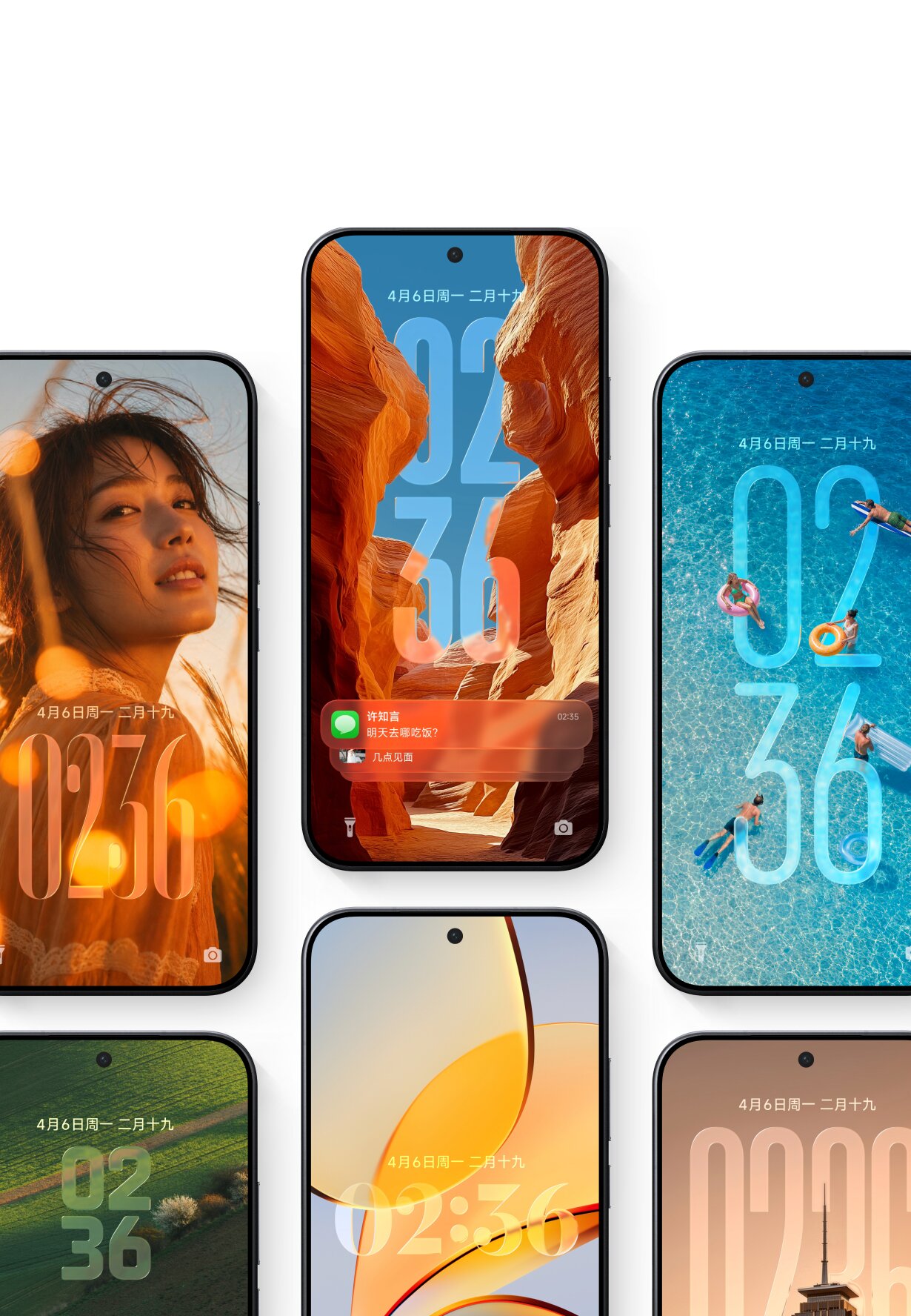
Widget Stacking Is Also a Flagship Glass Feature
HyperOS 4 will introduce desktop widget stacking, according to the leaked setup package.
The screenshots show several redesigned widgets, including:
- Weather
- Clock
- Calendar
- Music controls
- Brightness and volume controls
- Search
Many of them use translucent surfaces that reflect or blur the wallpaper underneath.
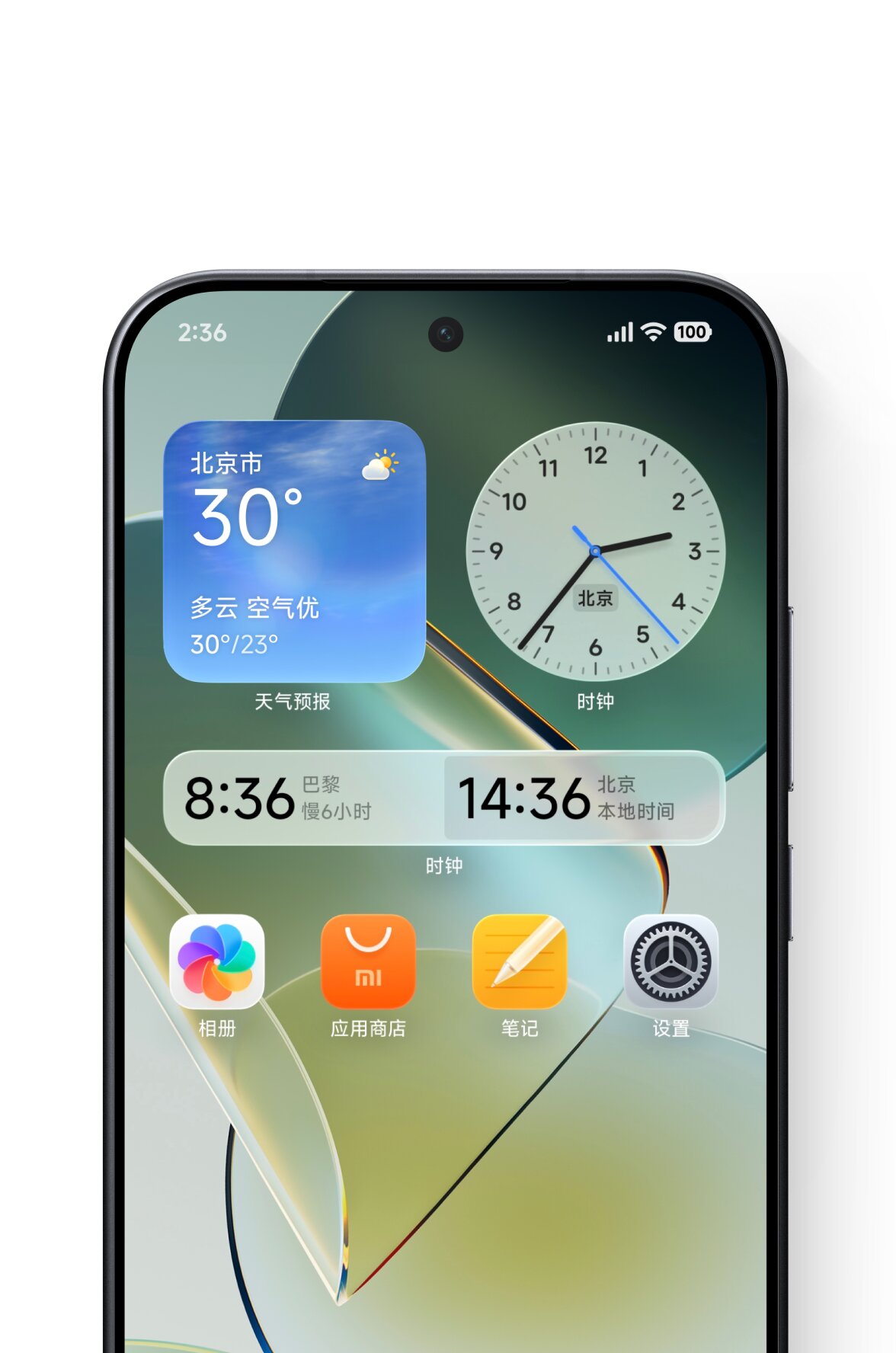
The internal entry for widget stacking again includes both “flagship” and “Glass.” This indicates that the full visual implementation may depend on supported hardware, even if simpler widget functionality reaches more devices. This feature already usable via leaked HyperOS Launcher V8.
Large Folders Get Size Switching
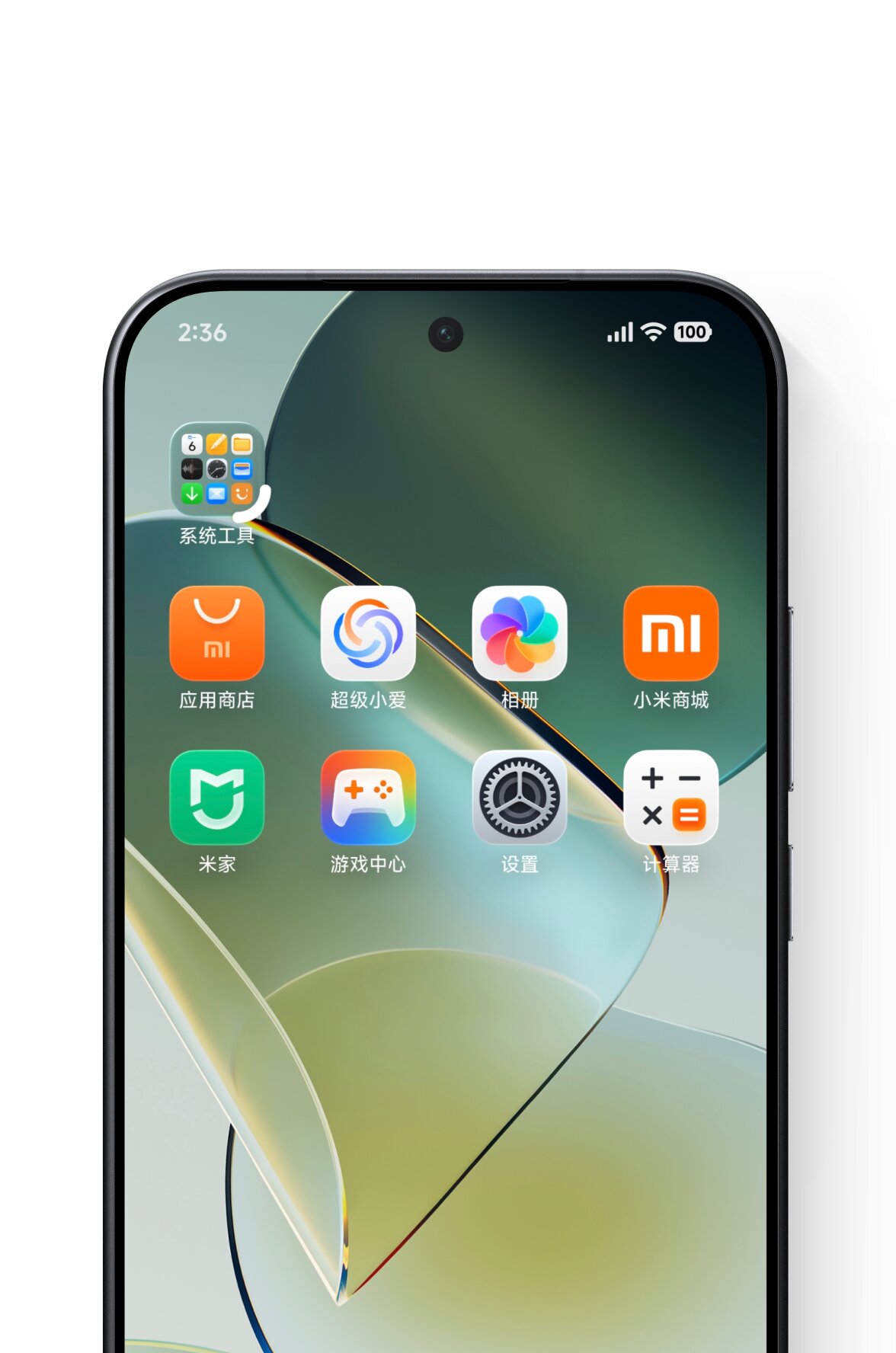
HyperOS 4 also appears to expand Xiaomi’s large folder system. The setup files reference folder size switching, while the screenshots show compact folders that can display multiple system applications directly on the home screen. Earlier HyperOS 4 V8 Launcher builds had already shown more flexible folder controls. The new setup leak now indicates that Xiaomi plans to present this as one of the main HyperOS 4 features.
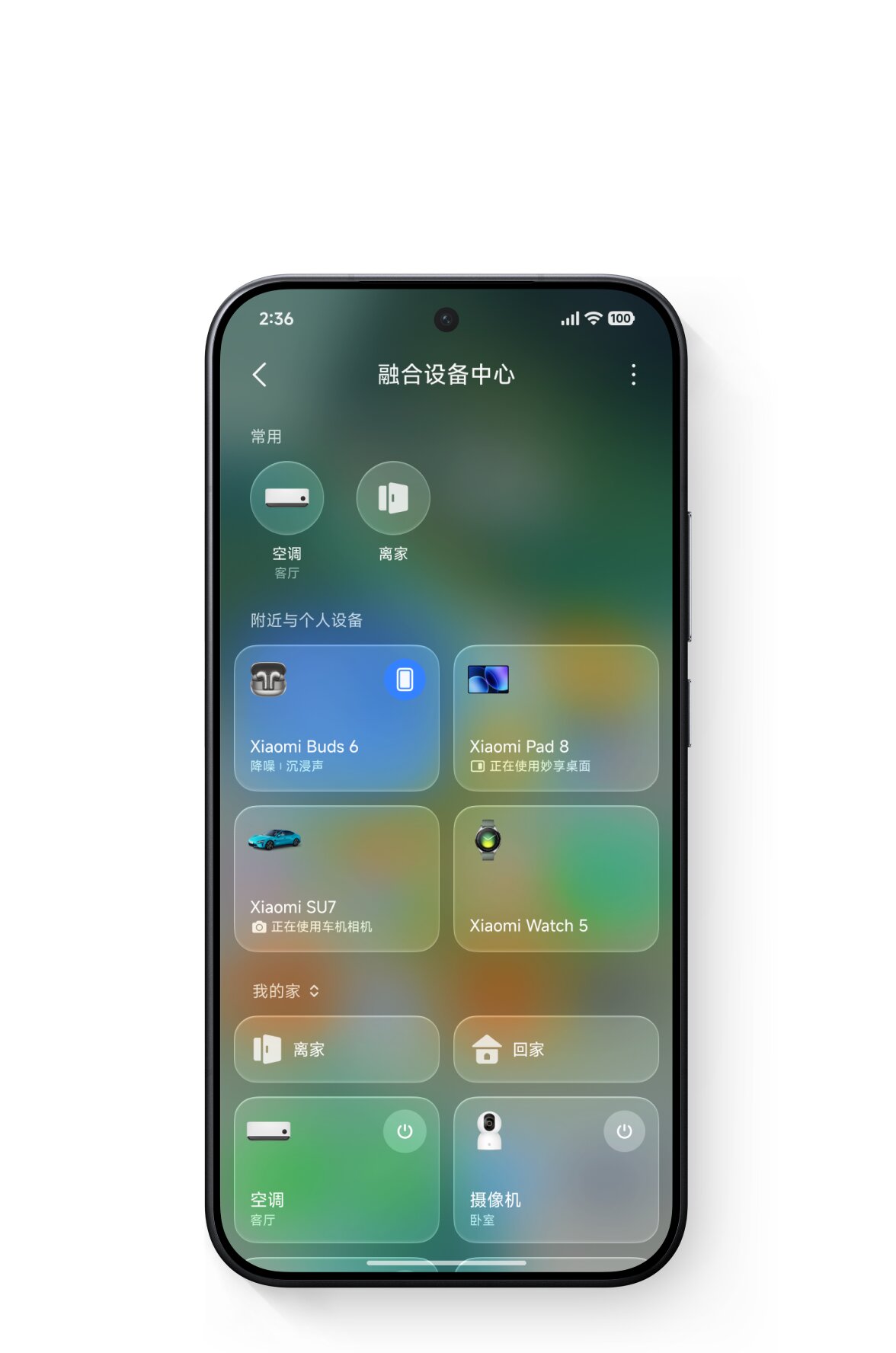
Xiaomi HyperConnect Device Center Gets a Full Glass Redesign
Another screenshot shows the redesigned Xiaomi HyperConnect device center. Connected products are displayed as large translucent cards, including examples such as:
- Xiaomi Buds
- Xiaomi Pad
- Xiaomi SU7
- Xiaomi Watch
- Air conditioner
- Smart camera
Each card blends with colors from the background. This is one of the clearest examples of the new Glass material system shown in the leak. The setup package calls this the “New Fusion Device Center”, referring to Xiaomi’s cross-device control interface.
Super XiaoAI Gets a New Floating Interface
HyperOS 4 also includes a major Super XiaoAI redesign. One screenshot shows the assistant appearing as a floating interface over the home screen. Another shows a compact status element near the top of the display while the assistant is processing a request. This matches the earlier Digital Chat Station report about an AI assistant floating island, which was described as similar in concept to an AI Siri interface.
The screenshots also show different AI modes, including:
- Automatic
- Fast
- Expert
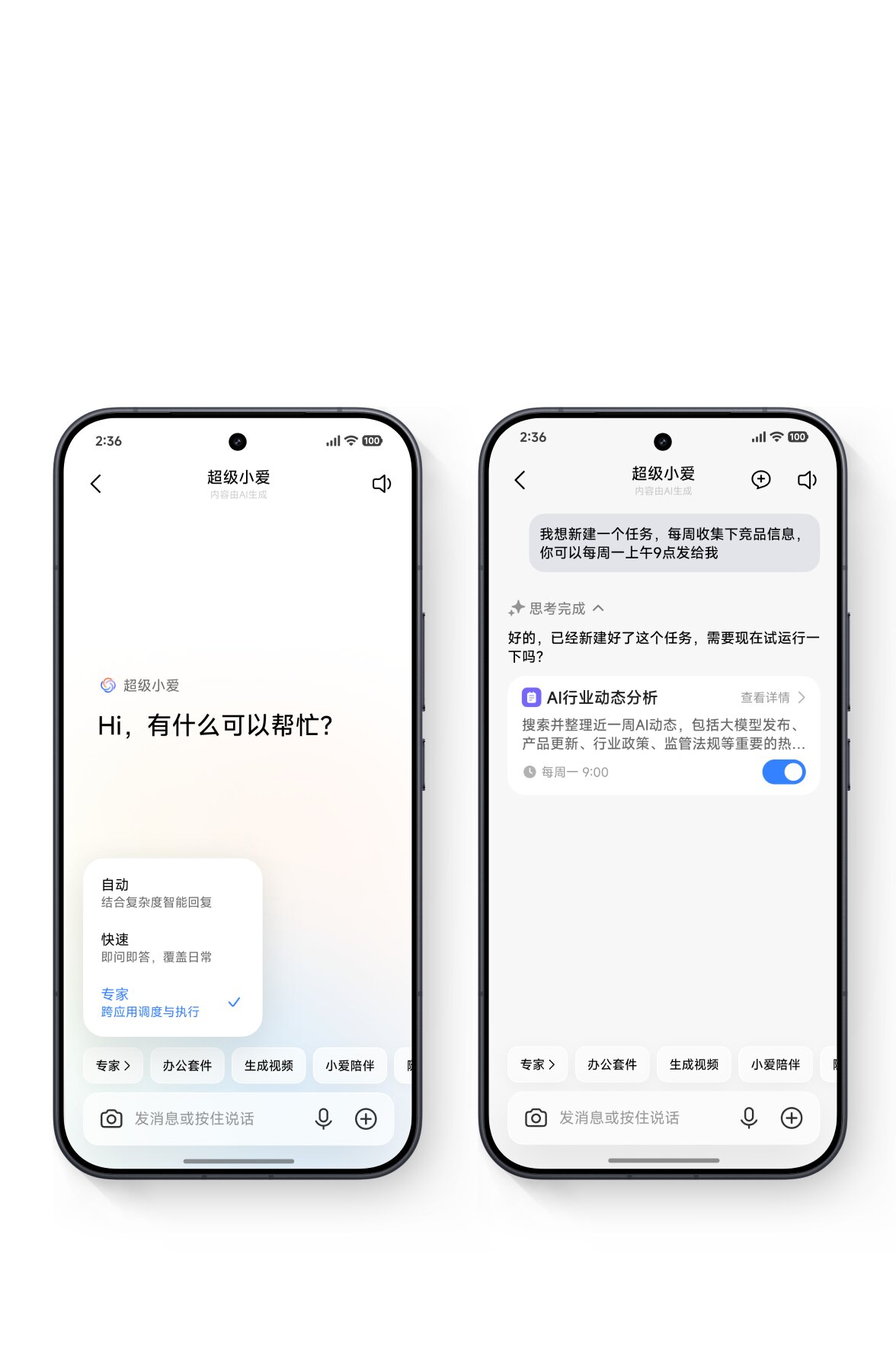
The leaked setup package separately lists Super XiaoAI Expert Mode, suggesting the assistant may allow users to select how deeply it processes a task.
Expert Mode Can Perform More Complex Tasks
The Expert Mode screenshot provides another clue about Xiaomi’s AI direction. A user asks Super XiaoAI to create a recurring task that collects product information every week and sends the result at a scheduled time. The assistant then creates an AI task card with a weekly schedule. This suggests Expert Mode may go beyond simple question answering and handle multi-step actions across applications.
However, the screenshots do not confirm which apps, regions, or languages will support this functionality.
AI Notes Gets Meeting Summaries and Smart Actions
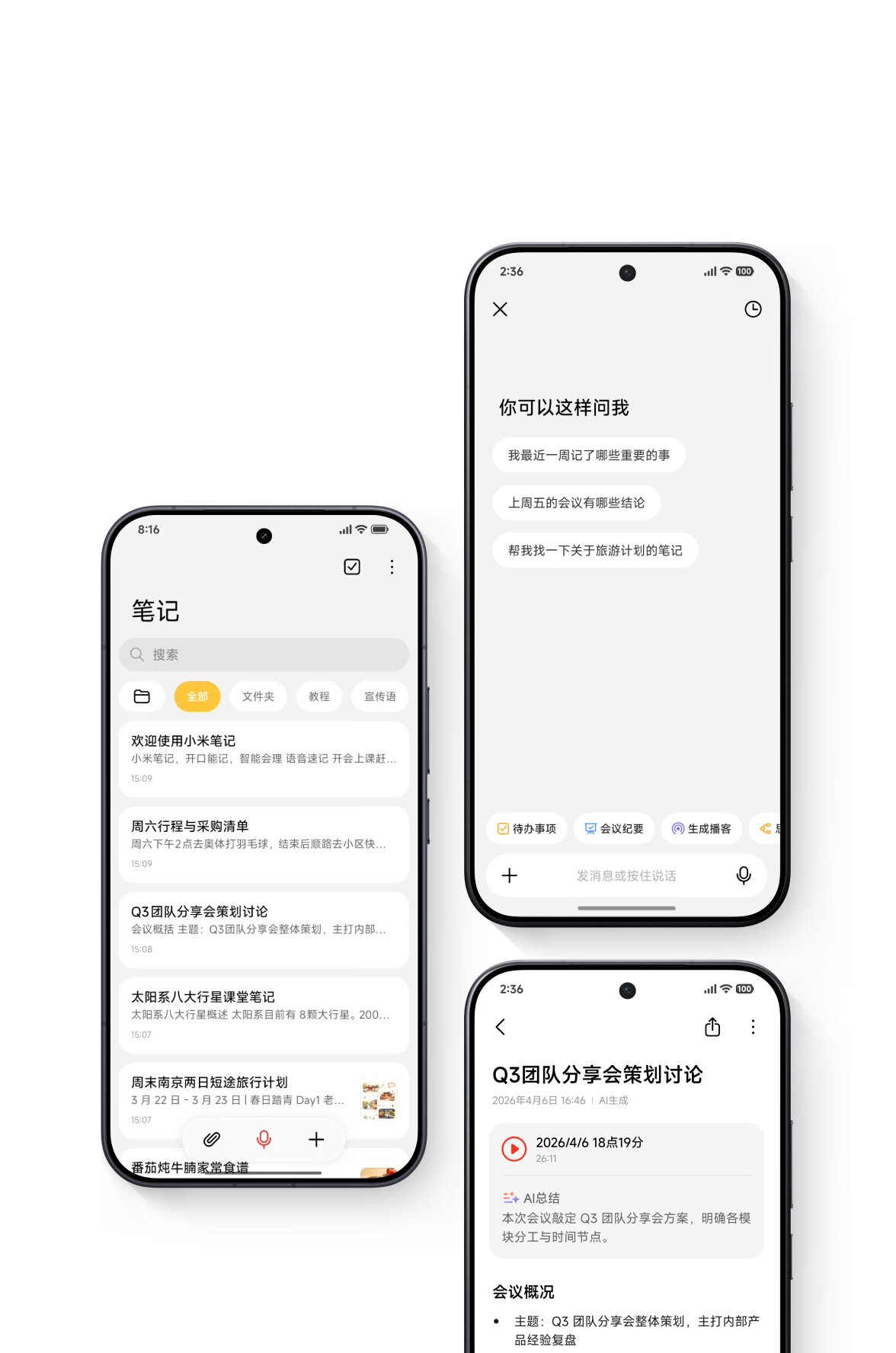
HyperOS 4’s Notes app is also receiving deeper AI integration. The screenshots show:
- Meeting recording
- AI meeting summaries
- AI-generated notes
- Task extraction
- Podcast generation
- Contextual AI questions
One example shows a meeting note with an audio recording and an automatically generated summary. Another interface allows users to ask questions about stored notes, including requests such as recalling important recent events or summarizing previous meetings. This appears to be more than a simple visual redesign. AI features are being integrated directly into the Notes workflow.
Xiaomi Intelligent Input Method Adds AI Writing Tools
The leaked setup package also lists a new Xiaomi Intelligent Input Method.
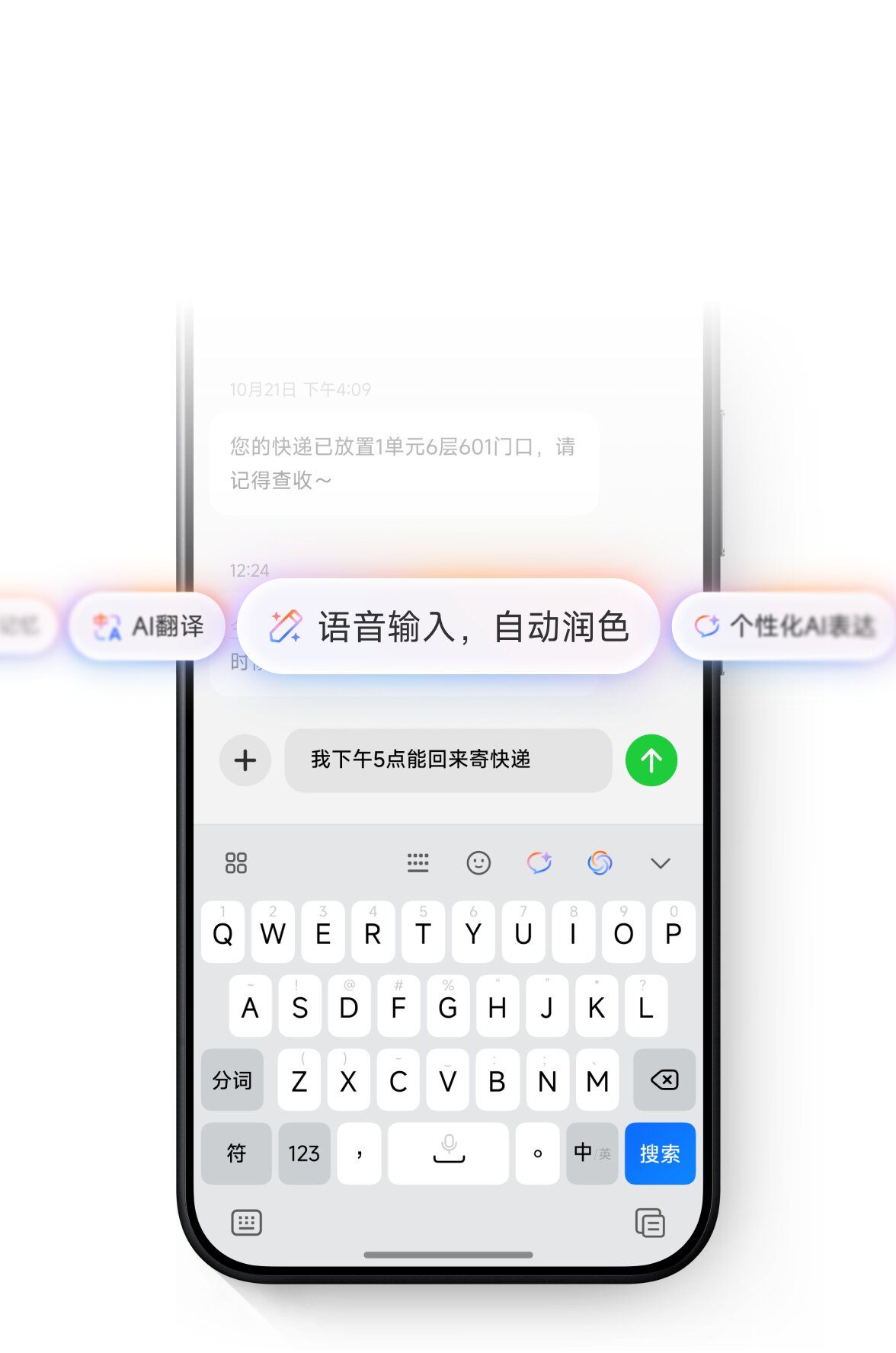
One screenshot shows an AI toolbar above the keyboard with options such as:
- AI translation
- Voice input
- Automatic text polishing
- Personalized AI rewriting
This suggests HyperOS 4 will bring system-level AI writing tools directly into text input rather than requiring users to open a separate assistant.
HyperOS 4 Could Arrive Very Soon
Based on the current development stage and the appearance of a finished onboarding package, HyperOS 4 looks much closer to release than earlier leaks suggested. Current information points to a possible launch at the end of August or in early September 2026. That timing is still not official, so it should be treated as an expected launch window rather than a confirmed date.
The setup package is important because it brings together many previously separate leaks in one place: Glass materials, lock-screen changes, stacked widgets, folder customization, AI input, AI Notes, Super XiaoAI, and the redesigned HyperConnect device center.
Users can check future HyperOS 4 eligibility through MemeOS Enhancer. Exact feature availability may vary by chipset, device tier, and region.



Radmi turbo 4pro Hyper Os 4
There is no option to download in our case, so please tell how to download.
smothes display
So what, will my Xiaomi 15t pro device now be deprived of many things.. how ridiculous. Its processor is dimensity 9400+
Xiaomi made HyperOS 4, but it was truly disappointing as Glass UI was only available for chipsets like the Snapdragon Elite and Elite Gen 5, Dimensity 9500, and Xiring 01-03
While Honor’s Snapdragon 8 Gen 2 devices already have all the latest features from the company, this proves that Xiaomi is truly terrible at optimization.
At least the Snapdragon 8 Gen 2 should be powerful enough to handle Glass UI, but Xiaomi wasn’t generous enough, which is really bad.
but
hyperos 4 is like hyperos 3 (no different)
when is my Redmi 14c update hyperos 4
but
hyperos 4 is like hyperos 3 (no different