


During the recent solar eclipse on August 12, Xiaomi users discovered an unusual camera behavior where the Sun was rendered to look like the Moon in photos. This effect stems from Xiaomi’s Supermoon mode, which uses AI scene recognition to enhance moon photos but can misinterpret bright round objects in the sky.
How Supermoon Mode Works
Supermoon mode is designed to recognize a bright, high-contrast spherical shape in a dark or dim sky. When activated, usually under the camera app’s More menu, it applies an AI-driven enhancement that overlays detailed lunar surface textures—such as craters—on the detected object. This mode supports zoom levels from 5X to 60X to help users capture close-up moonshots.
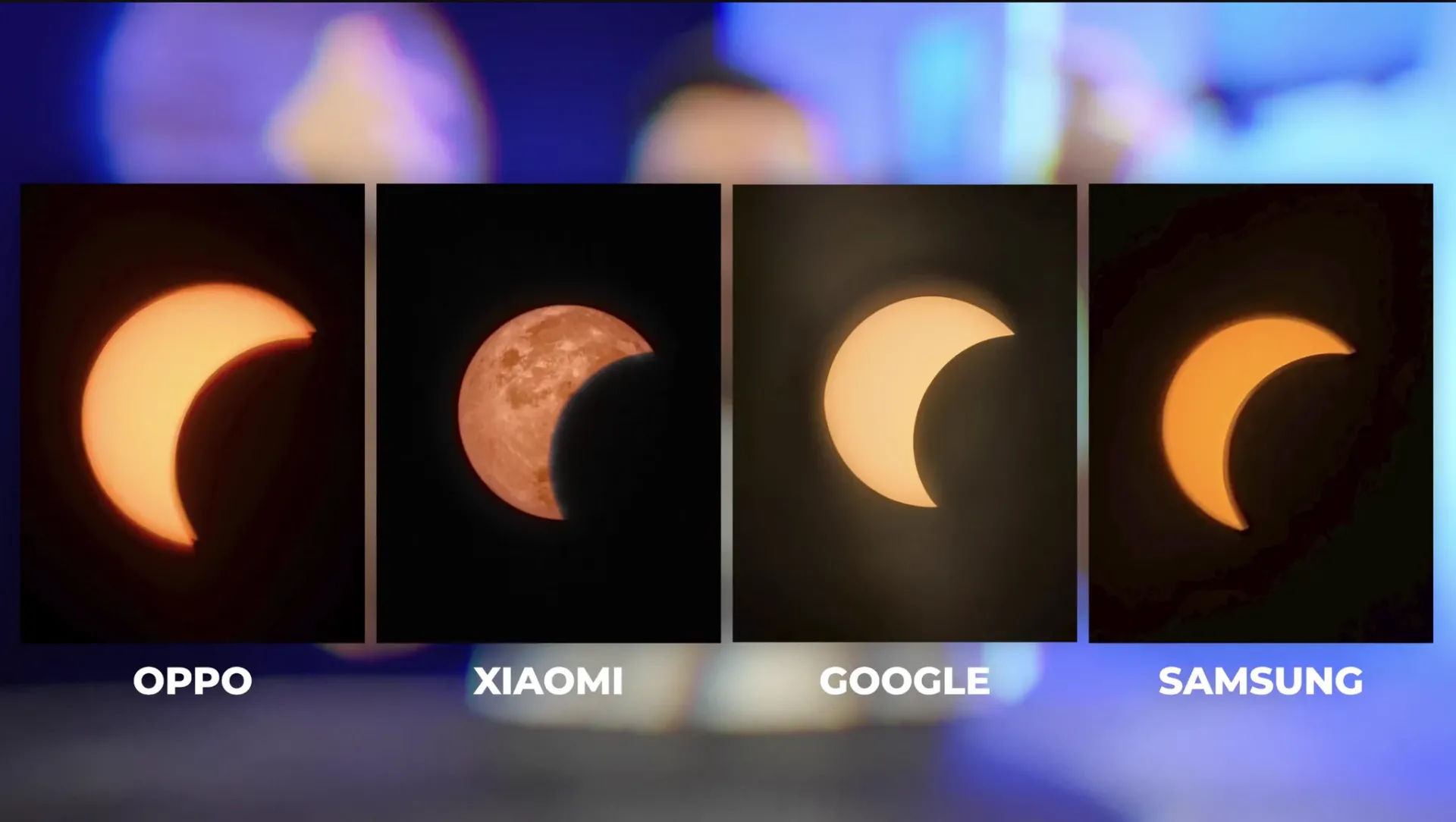
The Solar Eclipse Glitch
When users tried photographing the solar eclipse or bright sunspots, the AI mistakenly identified the obscured or filtered Sun as the Moon. Instead of capturing the actual solar event, the software overlaid a standard full moon texture, effectively turning the Sun into a fake “Supermoon” in photos. The AI enhancement ignores the true optical details during these events unless the mode is manually turned off.
This behavior sparked online interest and discussions, with some noting how AI in camera phones might alter genuine images without users realizing it. The glitch highlights potential pitfalls of AI scene recognition when it simplifies complex natural phenomena.
Capturing Celestial Events on Xiaomi Phones
For users aiming to photograph specific celestial events like eclipses, Xiaomi’s AI enhancements can interfere with accuracy. To get an unaltered shot, switching to Pro or manual mode and disabling AI scene enhancements is recommended. Xiaomi has not released a dedicated update to address this issue, but users can manually avoid the Supermoon mode during solar or similar events. Those needing assistance disabling AI enhancements or switching to Pro mode can specify their Xiaomi model for guidance.
Understanding AI Effects in Smartphone Photography
This incident illustrates how AI that improves photography can also unintentionally distort natural events when scene recognition overgeneralizes. Xiaomi’s implementation trades raw optical fidelity for visually enhanced moon pictures, which may not suit all use cases.
Users capturing rare events should remain aware of such automated features and test their camera modes accordingly.
Feature and update availability may vary by device, region, and HyperOS version.
For checking available updates and system app versions, users can refer to the MemeOS Enhancer app on Google Play.
Q&A
- Can the Supermoon mode be turned off? Yes, users can disable it by avoiding the Supermoon option in the camera’s More menu or switching to Pro mode where AI enhancements are off.
- Does this issue affect all Xiaomi phones? Supermoon mode is found in Xiaomi devices with this camera feature, but availability varies by model and software version.
- Will Xiaomi fix the solar eclipse glitch? No official fix has been announced. The mode can be manually bypassed for accurate event photos.
- Is the AI overlay present in all moon photos? Supermoon mode purposely adds this texture; moon images captured without it remain pure optical shots.
Source: x.com


Embarrassing to say tye least.