


Xiaomi has rolled out a significant design update for its Game Turbo utility. Arriving with version 12.5.4-260401.0.1, this update completely revamps the in-game overlay, shifting away from a traditional analytical view toward a highly modern, gamer-centric dashboard. Best of all, this updated interface is fully compatible and installable on Global ROMs across the broader Xiaomi, POCO, and REDMI ecosystems.
New the UI & UX Changes
When analyzing the new in-game overlay interface compared to its predecessor, it is clear that the new design offers a much more symmetrical, modern, and easily readable “control center” experience. Whether you are deep into late-night gaming or analyzing the interface’s design language during late-night creative hours, the improvements to the visual hierarchy are immediately noticeable.
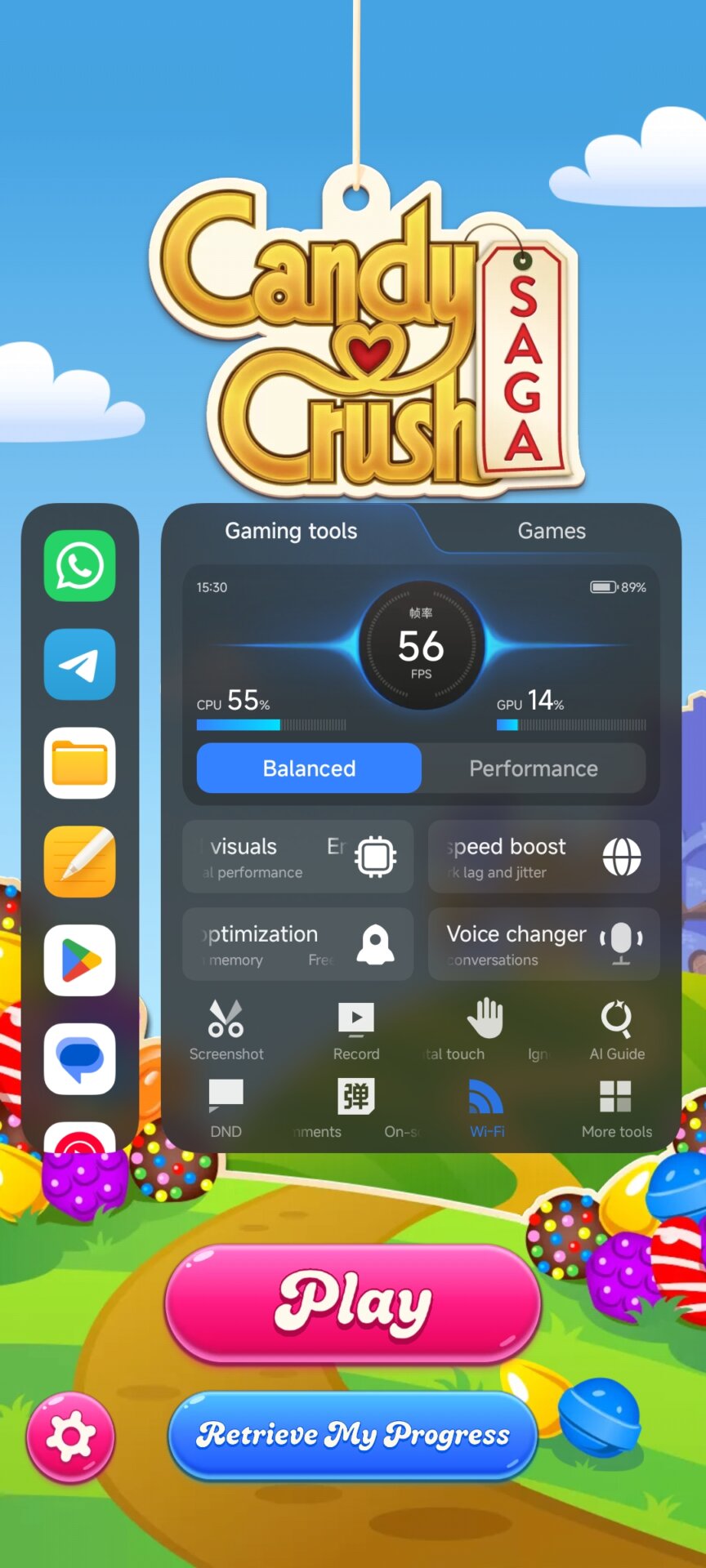
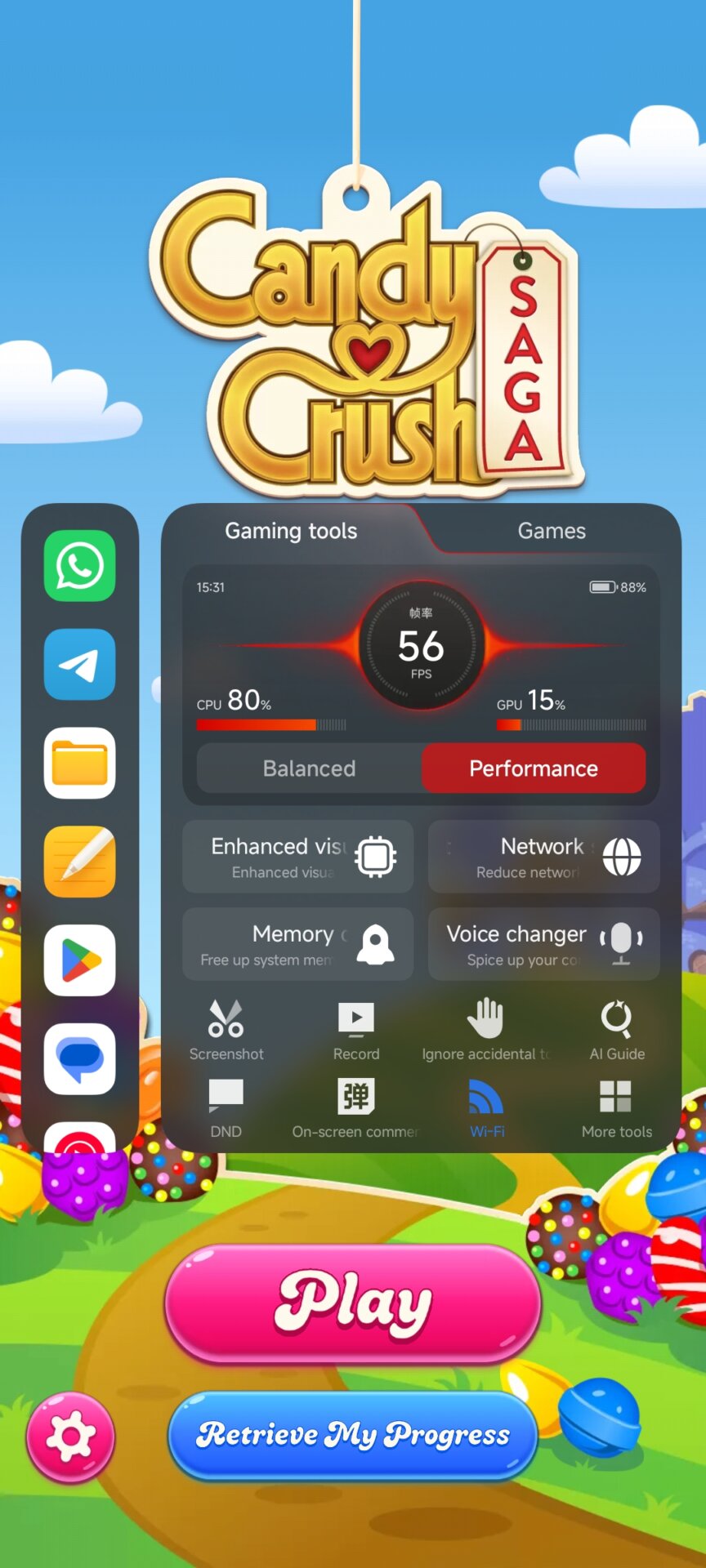
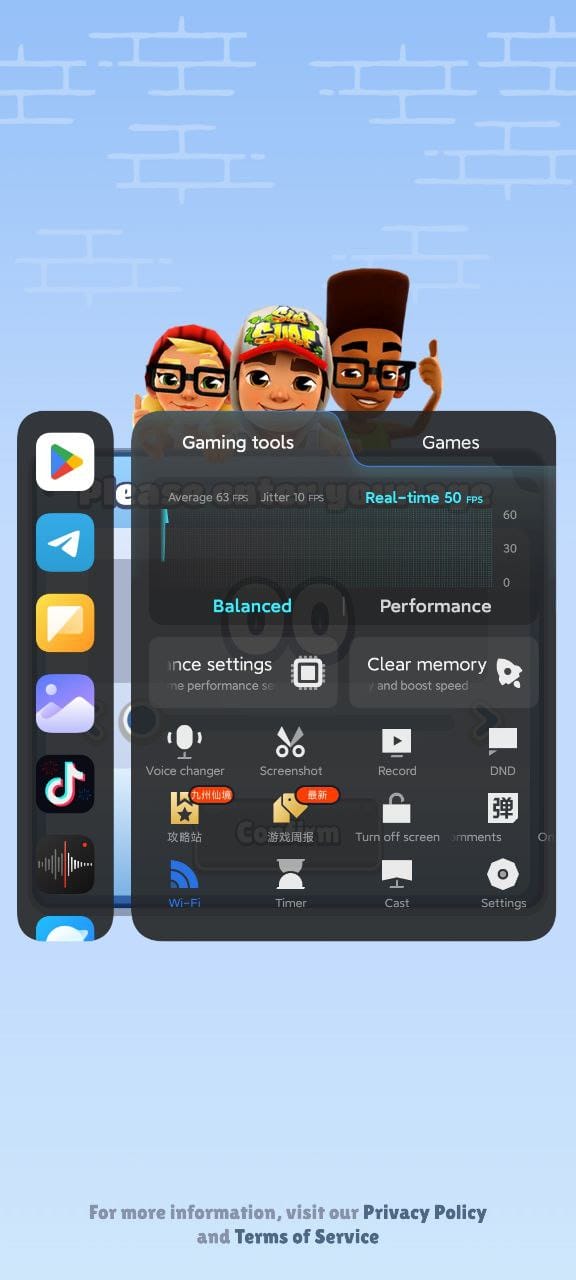
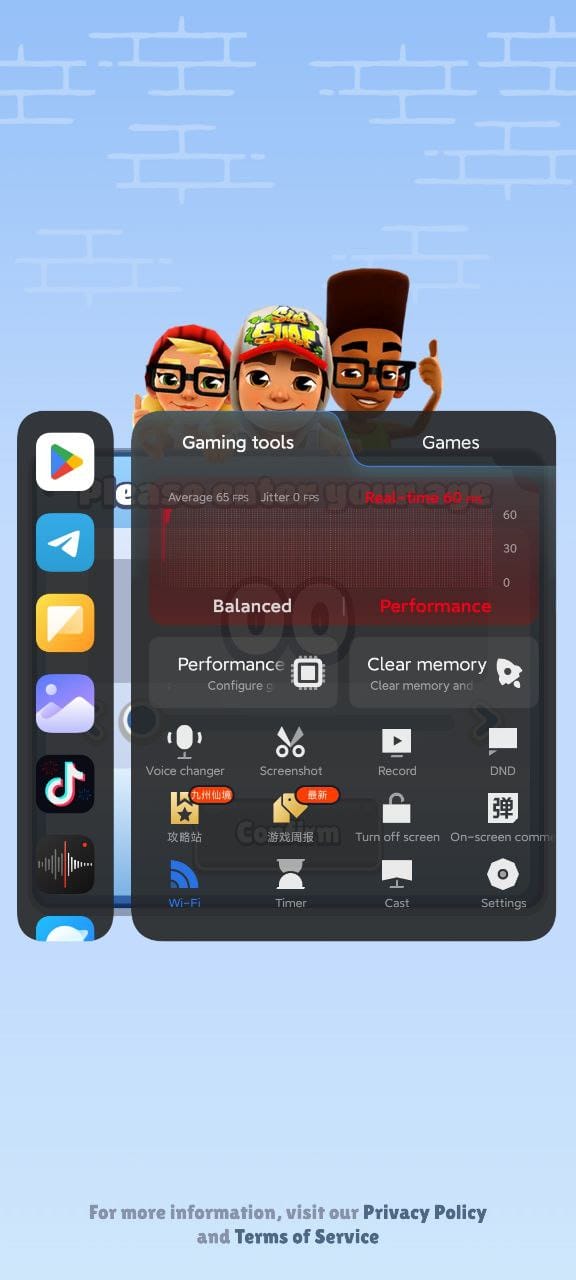
Here are the primary technical and visual differences between the two versions:
-
Performance Monitoring (Top Section):
-
Previous Design: CPU, GPU, and FPS values were presented like a technical data panel. It utilized a background line graph with text-based real-time and average FPS highlights. It was highly functional but visually flat.
-
New Design: The data presentation has fully embraced a dashboard aesthetic. The center now features a massive, gauge-style real-time FPS counter. CPU and GPU usage bars are placed symmetrically on the left and right of this central hub, creating a much stronger focal point.
-
-
Power Mode Toggles (Balanced vs. Performance):
-
Previous Design: Mode switches were simple text tabs placed over the graphing area that changed color when active, lacking the tactile feel of physical buttons.
-
New Design: Wide, pill-shaped buttons with distinct touch areas are now used for the “Balanced” and “Performance” modes.
-
Dynamic Color Feedback: The system now provides excellent visual feedback. Selecting a mode changes not only the button’s color but also the glowing effect around the central FPS gauge (Blue for Balanced, Red for Performance), instantly indicating your active power profile.
-
-
Quick Tools and Action Menu (Middle Section):
-
Previous Design: The 2×2 main setting blocks (like “Performance settings” or “Clear memory”) featured sharp corners, and the bottom grid of icons felt slightly cramped.
-
New Design: The corner radii of the tool blocks have been increased to perfectly match the rounded, fluid design language of Xiaomi HyperOS. Improved translucency effects and enhanced icon-to-text contrast have significantly boosted overall readability.
-
The previous design felt like an engineering-focused hardware monitoring tool. This new update represents a highly successful UI/UX evolution that brilliantly utilizes negative space. By prioritizing symmetry and directing the user’s eye straight to the most critical data—the active power mode and the FPS counter—the interface becomes much more immersive and far less distracting during intense gameplay.
How to install new Game Turbo update?
This visual overhaul proves Xiaomi’s ongoing commitment to refining the gaming ecosystem within Xiaomi HyperOS, ensuring that aesthetic improvements match their underlying system optimizations. You can download the latest version directly from MemeOSUpdates.com or seamlessly install it via the MemeOS Enhancer application.

When will it be released?
The enchance visual wont work and the others
Wow nice. Will this be available for Global variant too btw? 👀
Everything is in English. Even downloading the global version, it appears in Spanish.
Another problem that a message appears saying. (security keeps failing. accept. notify)
pliss,add expanding window to whatsApp/tiktok/or add games in games
Please, add expandable windows to WhatsApp/TikTok/or add games within the game.
I hope that this update fixes the problem I’ve been having, i purchased the premium version yet the app refuses to accept it and i have to Restore Purchase every single time i enter it
Unfortunately, as usual from Xiaomi, the Game Turbo program is bad in Arabic and does not work, with many errors that made me delete it from my device. Unfortunately, the device is Poco F7 Ultra.
Unfortunately, Xiaomi still does not care about Arabs or their language. How can a global language like Arabic not have a proper translation? Is there no programmer with you??? We Arabs send you translators. I have sent you many messages and there is no attention.
there’s alot of bugs GLOBAL
1. if you choose performance mode the light won’t switch to color red you need to close ng toggle sidebar switch and open it again to automatically change the color the same as you choose the balance mode its color red then you need to close the sode bar again to switch to color blue.
2. BUTTONS NOT WORKING
*Enhance Visuals
*Touch Controls
*Network Speed
please inform the developer with this thanks
Currently, the Redmi 15c (my current device) does not have any option to overlay apps on top of games. Is there any chance this feature will come with the Game Turbo update?
Currently, the Redmi 15c (my current device) does not have any option to overlay apps on top of games. Is there any chance this feature will come with the Game Turbo update?
Currently on the Redmi 15c there is no option to overlay apps over games, is there any chance this feature will arrive on my device with this Game Turbo update?
Honestly take my word for it when you design it try to add buttons like 120 hz / 90 hz device specific. more features and shortcuts tailored to enhance gaming, Thermal profile control from game turbo (eg. performance mode the real one from battery which turns ur battery blue, Devices fps changing instead of settings device brightness blah blah u get it) . It’s ur official app you can do it directly to system which is much more secure and in demand with gamers. Honestly instead of 2-3 unofficial apps to tweak my settings i would much prefer if it came from xiaomi itself it will give this mobile more and more enthusiasts.
Does anyone know if it will arrive on the Redmi 15C because the new design does not appear for me
it is not working, my phone is Poco x7pro , but in game turbo it shows 35fps why?
Is it also available for the Xiaomi mi 11i?
Is it also available for the Xiaomi mi 11i?
how about poco c65 it’s still doesn’t have game turbo it’s hard when it’s gaming because it’s lagging
TufanKhmari
My cloak is shabby
Unfortunately, the Game Turbo program inside the games does not support the Arabic language and provides a very small summarized data panel.
game turbo update auto
Will it be on the poco M7 pro 5g?